
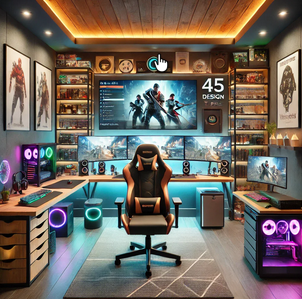
How to Decorate Your Video Gamers Room: 10 Smart Ideas to Build a Setup You’ll Love
A gaming room without thoughtful decoration is just a desk in a room. The setups that stop people scrolling on Instagram, the ones that make your friends say “whoa” when they walk in, the ones that genuinely feel like yours — they all share one thing in common: deliberate decoration. Not maximalist clutter. Not a wall of posters slapped up randomly. Real, intentional decoration that ties the space together and tells the world what kind of gamer you are.
In 2026, gaming room decor has officially graduated from “teen bedroom with RGB” to genuine interior design. The most-searched gaming room aesthetics on Pinterest this year are mature, considered, and stunning — dark cinematic moods, neon-lit cyberpunk vibes, cozy retro arcades, all-white streamer studios, and intentional maximalist galleries. Below are 10 actionable decoration ideas that work no matter your budget or room size. Pick the ones that match your style, mix and match where it makes sense, and you’ll build a gaming room you genuinely love walking into every night.
1. Choose a Single Theme and Commit Hard
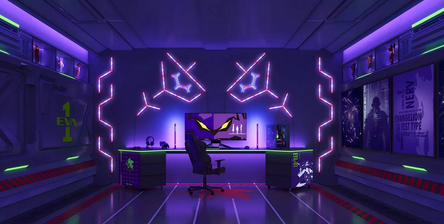
The biggest mistake gamers make is decorating without a theme — buying a piece here, a poster there, a random RGB strip somewhere else. The result is visual chaos. Rooms that look incredible online almost always have a clear, committed aesthetic: cinematic dark (charcoal walls, matte black furniture, low-profile LED accents), synthwave/cyberpunk (deep purples and teals, neon signs, dark base), cozy gamer (warm wood tones, plants, fairy lights), or all-white streamer studio (pastel accents, high contrast for camera).
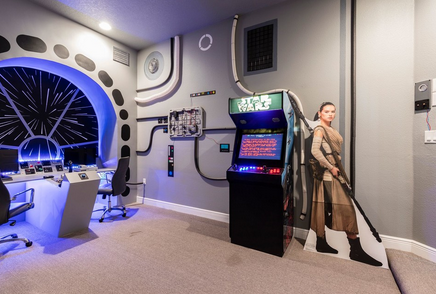
Pick one and let it dictate every subsequent decoration purchase. The discipline pays off — even a budget setup looks deliberate and curated when every piece supports a single vision. Browse Pinterest for an hour with one keyword phrase (“dark academia gaming room,” “cyberpunk gaming setup,” etc.) to lock in your inspiration before you buy a single thing.
2. Build a Statement Wall Above Your Monitor
Your monitor wall is the focal point of the entire room — both physically (it’s where you look for hours) and visually (it’s what shows up on every stream, every video call, every photo). It deserves a single statement piece of decoration above or behind the monitor that anchors the whole setup. For most gamers in 2026, that means one large piece of wall art — 18×24 or 24×36 inches at minimum — rather than five smaller scattered prints.
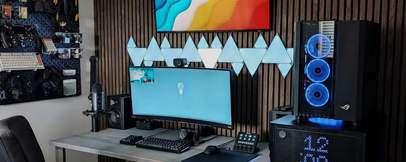
Options that work brilliantly: a single neon-style gaming poster from your favorite franchise, a piece of original game-inspired art from Etsy, a framed map (Hyrule, Tamriel, the Mushroom Kingdom), or a minimalist character portrait. Save smaller pieces for walls that aren’t in your camera frame.
Get framed gaming wall art: Check gaming posters on Amazon →
3. Layer Your Lighting in Three Distinct Zones
This is the principle that separates amateur setups from genuinely photogenic ones. Professional gaming room design uses three lighting layers working together: task lighting (a desk lamp or monitor light bar that illuminates your keyboard without glare on the screen), ambient lighting (LED strips along ceiling edges or behind the desk for soft fill light), and feature lighting (neon signs, Nanoleaf panels, Pixoo pixel displays, or a centerpiece light that defines the room’s personality).
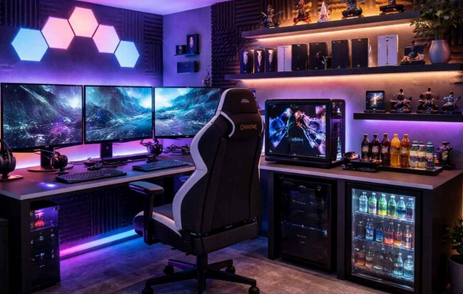
The classic mistake is using only feature RGB and skipping task and ambient. The result is a room that looks impressive in photos but is awful to game in — dim, glare-heavy, and tiring within an hour. Layer all three and your room will look intentional and feel functional.
Get smart LED strips: Check Govee or Hue LED strips on Amazon →
4. Add a Neon Sign as Your Personality Centerpiece
Custom neon signs have become the signature decoration of 2026 gaming rooms — and for good reason. A single well-chosen neon piece does more for a room’s vibe than ten small accessories combined. Options that work: your gamertag in custom script, a controller outline, a power button symbol, your favorite game logo, or a witty phrase (“press start,” “GG WP,” “loading…”).

LED neon (rather than true glass neon) is the practical choice — affordable, safer, energy-efficient, and customizable in any color or shape. Etsy, Custom Neon, and dedicated gaming neon shops on Amazon all offer this. Place the sign on a feature wall behind or beside your monitor where it shows up in stream backgrounds, video calls, and photos.
Get a custom LED neon sign: Check LED neon signs on Amazon →
5. Display Your Collectibles with Intent
Random Funko Pops on a desk look like a teenager’s bedroom. The same figures arranged thoughtfully on floating glass shelves with small picture lights look like a curated gallery. The difference isn’t the collectibles — it’s the presentation. In 2026, the rule is: fewer items displayed deliberately beats more items scattered. Rotate seasonally rather than displaying everything at once.

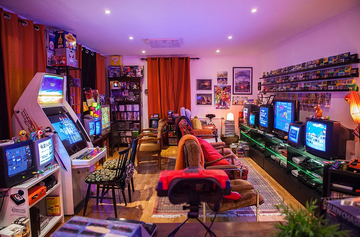
Smart display options include floating shelves above the desk, a glass-door cabinet for premium statues and amiibo, a single dedicated shelf for retro consoles arranged chronologically, and clear acrylic stands for display-worthy controllers. Add small uplights or strip LEDs to highlight specific pieces — instant museum vibes for almost no money.
Get floating display shelves: Check floating shelves on Amazon →
6. Build a Gallery Wall of Mixed Gaming Art
For gamers who can’t pick a single franchise, the curated gallery wall is the answer. The 2026 approach is “intentional maximalism” — multiple pieces working together as a unified composition rather than scattered randomly. The trick is consistency in something — same frames across all pieces, same color palette, or same artistic style (all neon, all minimalist, all pixel art) — while varying the content.
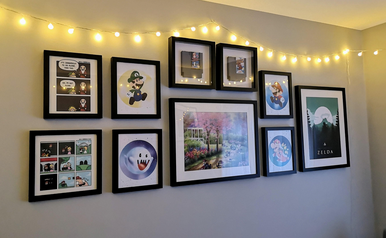
Mix sizes and orientations for visual interest: one large anchor piece, two medium pieces flanking it, and three to five smaller pieces filling the surrounding space. Print quality matters more than people realize — cheap photo prints scream “dorm room”; properly framed gallery prints feel like a deliberate collection. Etsy, Displate, and dedicated gaming print shops all offer high-quality options.
7. Soften the Hard Surfaces with Textures
Most gaming rooms have a problem: too many hard surfaces (desk, monitor, walls, peripherals) and not enough soft ones, which causes echo on streams, fatigue during long sessions, and a sterile feel that no amount of RGB fixes. The 2026 trend is layering textiles strategically to add warmth without clutter.
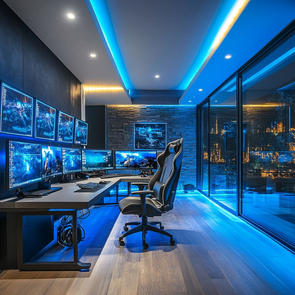
Quick wins that transform a room: a thick high-pile rug under the desk (also stops chair-wheel clatter), heavy curtains over windows (blocks glare during day, adds drama at night), an acoustic panel arrangement on the wall behind your seating, and a textured throw blanket on your secondary seating. PET felt acoustic panels in hexagons, slatted wood patterns, or printed art designs are the 2026 favorite — they look like premium decor while killing echo.
Get a high-pile gaming room rug: Check rugs on Amazon →
8. Use a Color Palette Across Everything
Rooms that look professionally designed all do one thing the same: they limit their color palette to 2-4 colors and repeat those colors across every surface. Random color choices everywhere — green LEDs, red mouse, blue keyboard, purple wall art — fight each other and create chaos. The fix is picking your palette upfront and applying it ruthlessly.
The 2026 standout palettes are: moody dark (charcoal + matte black + a single accent like emerald or deep red), cyberpunk (deep purple + teal + neon pink), cozy warm (warm wood + cream + sage green), and clean white (white + pastel pink or blue + black). Coordinate the RGB on your peripherals, the colors on your wall art, the bedding/seating, and even the cable sleeves to match. The cohesion makes everything look twice as expensive.
9. Add Plants for Life and Color
Living plants are the single most underrated gaming room decor. They add color and softness against hard tech surfaces, improve air quality during long sessions, and make a room feel lived-in rather than sterile. The catch is most gaming rooms have low light — basements, bedrooms with closed curtains, rooms dominated by monitor glow.
Low-light tolerant picks that thrive in gaming rooms: snake plants (basically indestructible), pothos (trailing vines that work brilliantly on floating shelves), ZZ plants (slow-growing, low-water, sculptural), and Chinese evergreens (genuinely beautiful in low light). For the lighting-allergic, high-quality faux plants from Pottery Barn or West Elm are now indistinguishable from real ones in photos. One or two well-placed plants change a room’s entire feel.
Get low-light indoor plants or faux options: Check indoor plants on Amazon →
10. Hide the Tech, Reveal the Personality
The most counterintuitive 2026 trend: the highest-end gaming rooms hide their gaming gear when not in use. Built-in cabinets with flush doors that hide PCs and consoles. Floating cabinets that look like wall art but reveal controllers and accessories behind them. Under-desk drawers that hide the chaos when guests come over. The principle: when the gear is invisible, the decoration becomes the room.
Practical ways to apply this on any budget: an under-desk drawer for controllers and cables, a closed cabinet for consoles instead of an open shelf, fabric storage boxes on shelves for cables and accessories, and a cable management system that routes everything to one hidden tray. The room reads as a designed space rather than a tech showroom — and the gaming gear feels even more special when you reveal it.
Get an under-desk hidden storage drawer: Check under-desk drawers on Amazon →
How to Plan Your Gaming Room Decoration in 2026
Three quick guidelines before you start buying decor. Sketch the room before you decorate. Map your walls, identify your focal wall (the one behind your monitor), and decide where the statement piece, the gallery, and the neon will go. Decoration is about composition — random additions almost always look random. Spend more on fewer, bigger pieces. One $80 framed print does more visual work than five $15 posters. The same applies to neon signs, floating shelves, and rugs — the bigger, fewer, and higher-quality your decor pieces, the more expensive the whole room reads.
And plan around the camera if you stream. Whatever shows up behind you in webcam shots is your channel branding. Make sure the wall behind your seat is your strongest decorative wall, not the messiest one. Test the framing with your actual camera setup before finalizing decor placement — what looks great in person can look off-balance on stream.
Final Summary: Build the Gaming Room You’ll Be Proud Of
A great gaming room in 2026 isn’t about spending the most money — it’s about applying smart decoration principles consistently. Pick a single theme and commit. Build a statement wall above your monitor. Layer your lighting in three zones. Add a personality-defining neon sign. Display collectibles with curation, not chaos. Build a coherent gallery wall if you go multi-franchise. Soften hard surfaces with textures. Stick to a tight color palette. Add plants for life. And hide what doesn’t deserve to be seen.
Follow even half of these and your gaming room will outperform setups that cost twice as much. The truth most decor guides miss is that the most impactful decoration moves are almost always the small intentional ones — a single great neon sign, one perfectly framed poster above the monitor, a rug that ties the floor together, three plants that make the room feel alive. Spend the big money where it matters most (your focal pieces), then layer the inexpensive details that quietly transform everything else. Decorate slowly, decorate deliberately, and build a gaming room you’ll genuinely love sitting in every night.